Square Website
Square Invoicing (part of the Square suite of business tools) is an online invoicing solution that enables freelancers and small businesses to create and send professional invoices, estimates, and contracts through a user-friendly platform. The core invoicing features are free to use, making it accessible for solo entrepreneurs and startups without adding another monthly expense. Backed by Square’s reputation in payment processing, Square Invoicing combines credibility with convenience. Over 200 million invoices (totaling more than $45 billion in payments) have been sent through Square globally. One of Square’s bold claims is that using its invoicing system helps you get paid faster; 75% of Square invoices get paid within one day of being sent. If you’re searching for an invoicing solution that can save you time, help you look professional, and improve your cash flow without breaking the bank, read on. By the end of this review, you’ll know if Square Invoicing is the right tool for your business needs.
With Square Invoicing, you can create an unlimited number of invoices and client estimates at no cost. There’s no cap, even on the free plan, so your billing won’t face restrictions as your business grows.
The invoice creation process is straightforward: enter your customer’s details, add line items or services, and send. Invoices can be delivered via email, text/SMS, or by sharing a link, either from your computer or the mobile app.
Many users note how quickly they can generate an invoice on Square, often in under a minute. This is particularly valuable for freelancers who need to bill clients on the go or small business owners wearing multiple hats who don’t have time for complicated software.
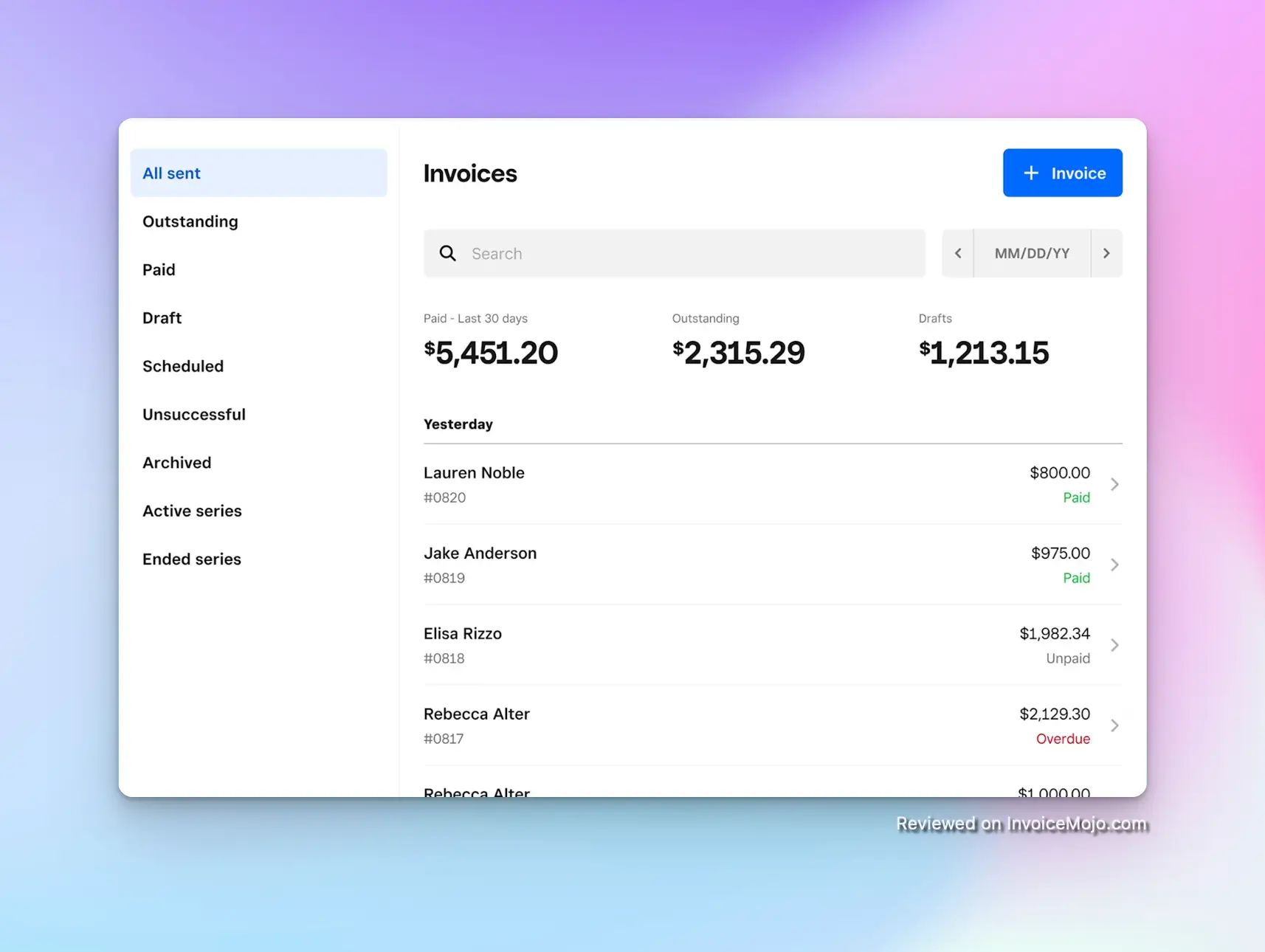
Invoices list in Square
Every invoice you send is tracked in real-time. You can see when a client has viewed the invoice and when they’ve paid, all from the Square dashboard or app. The system auto-generates sequential invoice numbers and lets you add notes or attachments (like contracts or photos) to add a professional touch.
The Estimates feature is also handy: you send an estimate, the client can approve it online, and then you can convert that estimate to an invoice with one click, eliminating duplicate data entry.
For freelancers and businesses that charge clients on a regular schedule (monthly retainers, weekly service fees, or subscription-style billing), Square Invoicing offers robust recurring invoice functionality. You can set up an invoice to repeat at whatever interval you need (daily, weekly, monthly, yearly, or custom).
Square will automatically send those invoices on your schedule, allowing you to “set it and forget it”: no more manually creating bills each cycle. This saves significant time for anyone with ongoing contracts or subscription services.
In addition, Square helps you get paid on time through automatic payment reminders. You can configure reminders to go out before an invoice is due, on the due date, and after the due date if unpaid. For example, you might set reminder emails to send 7 days before due, on the due date, and follow-ups 1 and 3 days past due, all automatically.
These gentle nudges can dramatically reduce late payments (and save you the awkward task of chasing clients). Customers often appreciate the reminders too, as it helps them avoid overlooking an invoice.
Another useful feature is the ability to set late fees on overdue invoices (either a fixed fee or percentage). If a client hasn’t paid by a certain time, Square can automatically apply your predefined late fee to the invoice, which can incentivize timely payment.
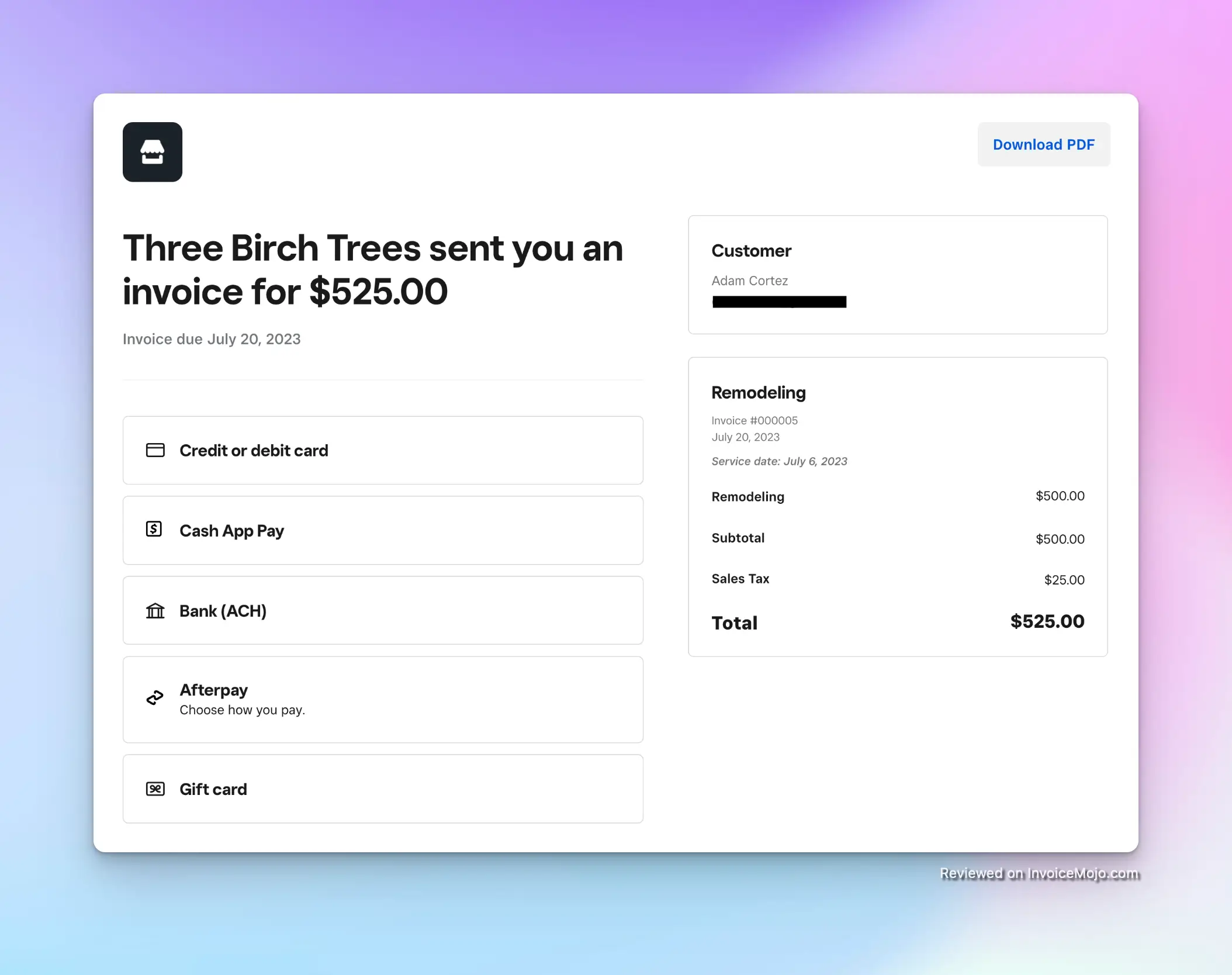
Offering multiple payment methods via Square
One of Square Invoicing’s biggest strengths is the range of payment options it gives your clients, making it as easy as possible for them to pay you.
Every invoice includes a secure payment link where clients can pay online via credit or debit card (all major brands) or ACH bank transfer (electronic check). Even more convenient, customers can pay using digital wallets like Apple Pay or Google Pay with just one click.
This is great for mobile-friendly checkout: if your client opens the invoice on their smartphone, they can pay with Face ID or a tap of their Android wallet, no manual card entry needed. The simpler it is for the client to pay, the faster you get your money.
Square Invoicing also supports Buy Now, Pay Later via Afterpay, allowing your client to split payments (you still get paid upfront, minus fees). And if you do business in person as well, you can accept an in-person payment against an invoice using a Square card reader. Cash or check payments can be recorded on the invoice too.
Clients can also securely save their card on file for future payments, which is convenient for recurring billing or repeat customers (with their consent, of course).
Because Square is a full-fledged payment processor, you benefit from their fast deposit times. Invoice payments usually land in your linked bank account within one to two business days, or you can get instant deposits for a small additional fee if you need funds immediately.
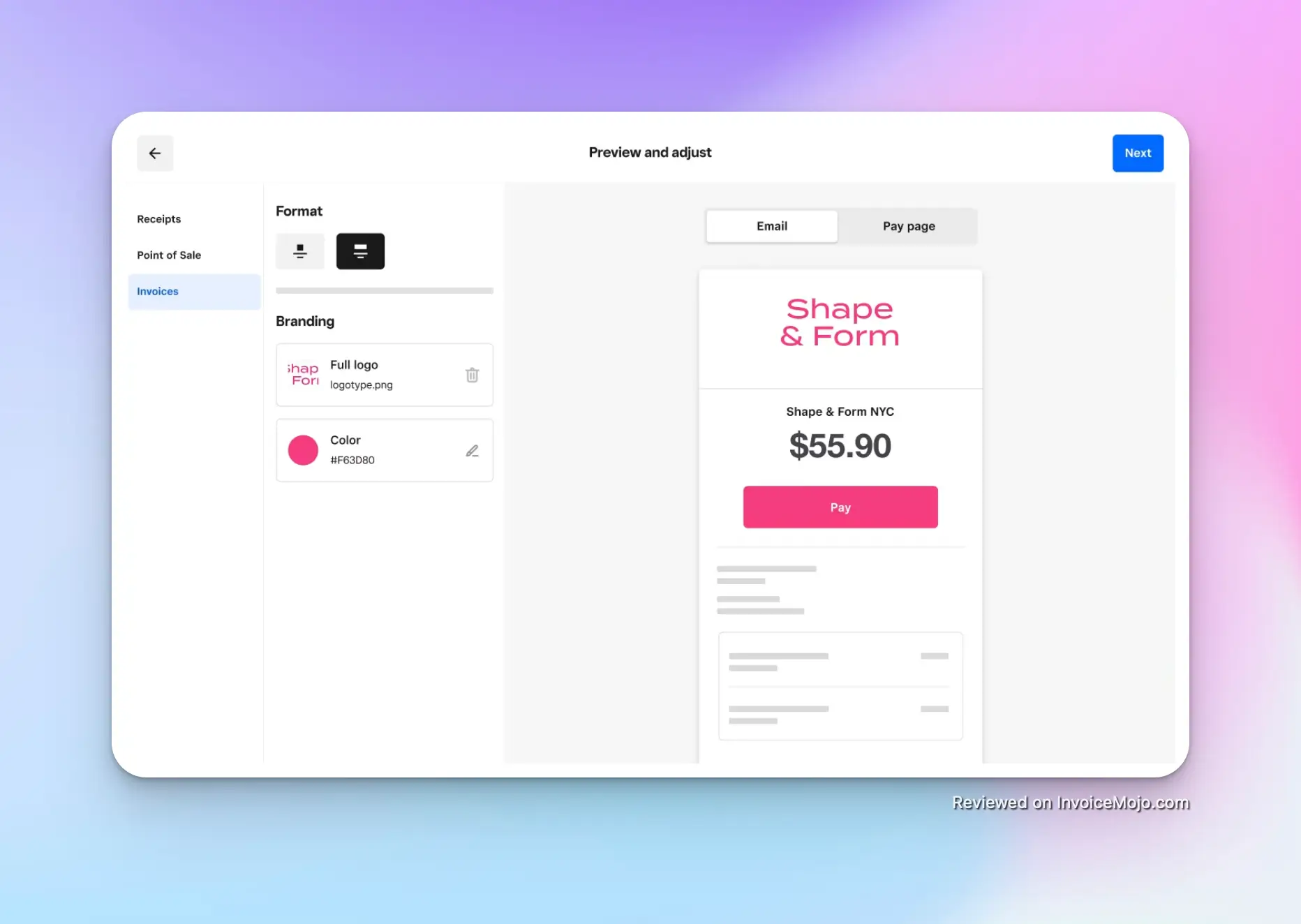
Customization of invoices in Square
Looking professional is important when invoicing clients, and Square provides tools to customize your invoices to reflect your brand. Even on the free plan, you can upload your business logo to appear on invoices and choose your brand color to personalize the design.
The templates are clean and modern by default, so your invoices will look polished and trustworthy to clients. You can customize item names, add descriptions, taxes, and apply discounts as needed on each invoice, giving you flexibility to bill for anything from hourly services to products.
Square Invoicing recently introduced Invoices Plus, a paid upgrade that unlocks advanced customization features. With Plus, you can create and save custom invoice templates for different use cases. You can also add custom fields to invoices or contracts. For example, a field for “Purchase Order Number” or “Project Code” if your clients require that.
Plus users even get the ability to choose different invoice layout designs. These advanced customizations are especially useful for growing businesses that want tailored invoices or need to include extra information for their industry.
Additionally, Square allows you to attach files (up to 25MB total) to an invoice: handy for attaching a formal contract, photos, or any supporting documents. And if you need client sign-off, Square Invoices integrates an e-signature feature: you can request a customer’s signature on estimates or contracts before work begins, all electronically.
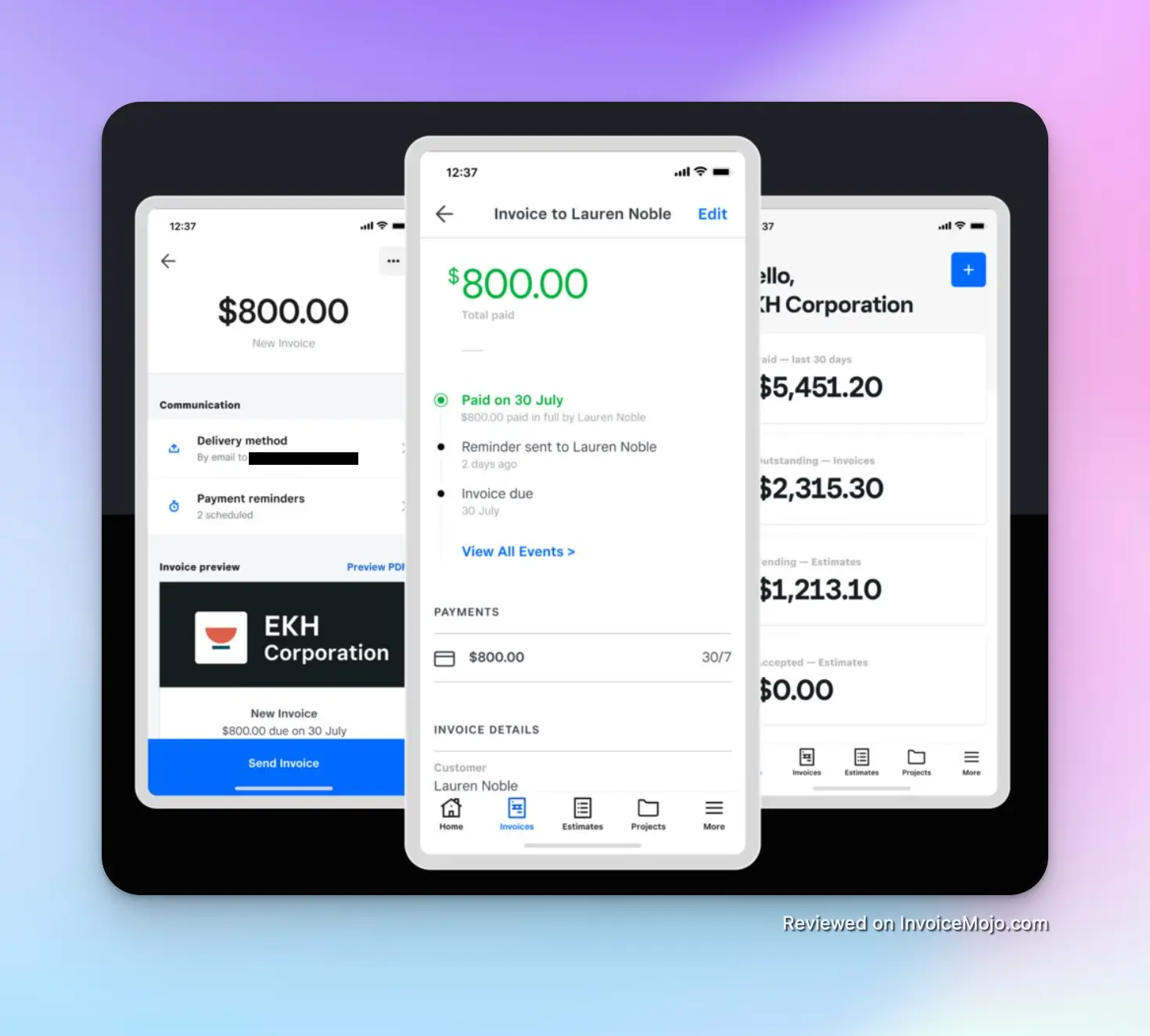
Square mobile app for invoicing
Beyond just invoicing, Square provides light CRM (Customer Relationship Management) functionality through its Customer Directory integration. Each client you invoice is saved in your directory with their contact info, and you can add notes or see their lifetime invoice history.
Square automatically groups customers based on behavior, and you can create custom groups (like “VIP clients” or tag them by project type). This ties into Square’s other marketing tools if you use them. Even if you don’t use those extras, having a centralized customer list is useful. The next time you invoice the same person, it auto-fills their details.
Square Invoicing also gives you basic reporting to monitor your invoicing activity. On the dashboard, you can see metrics like total outstanding invoices, paid invoices, and overdue amounts. There are about 15+ detailed reports available (e.g., sales by item, payments by date, etc.) that can help you track your cash flow.
While it’s not a full accounting package (it focuses on invoices and payments, not expense tracking), you can integrate Square with accounting software like QuickBooks or Xero to fill that gap if needed.
Another handy feature for service providers is the ability to require a deposit or partial payment upfront on an invoice. Square Invoicing lets you request a certain percentage or amount as a deposit when sending an invoice. This is great for freelancers who want to secure partial payment before starting a project.
Square’s free tier is feature-rich, but if you need more, the Square Invoices Plus plan offers several advanced tools. It costs $20 per month and comes with a 30-day free trial.
Key features unlocked by Plus include:
All core functionality (unlimited invoices, recurring billing, basic reminders, etc.) is available on the free plan. Plus is completely optional and designed for businesses that need more advanced features as they scale.
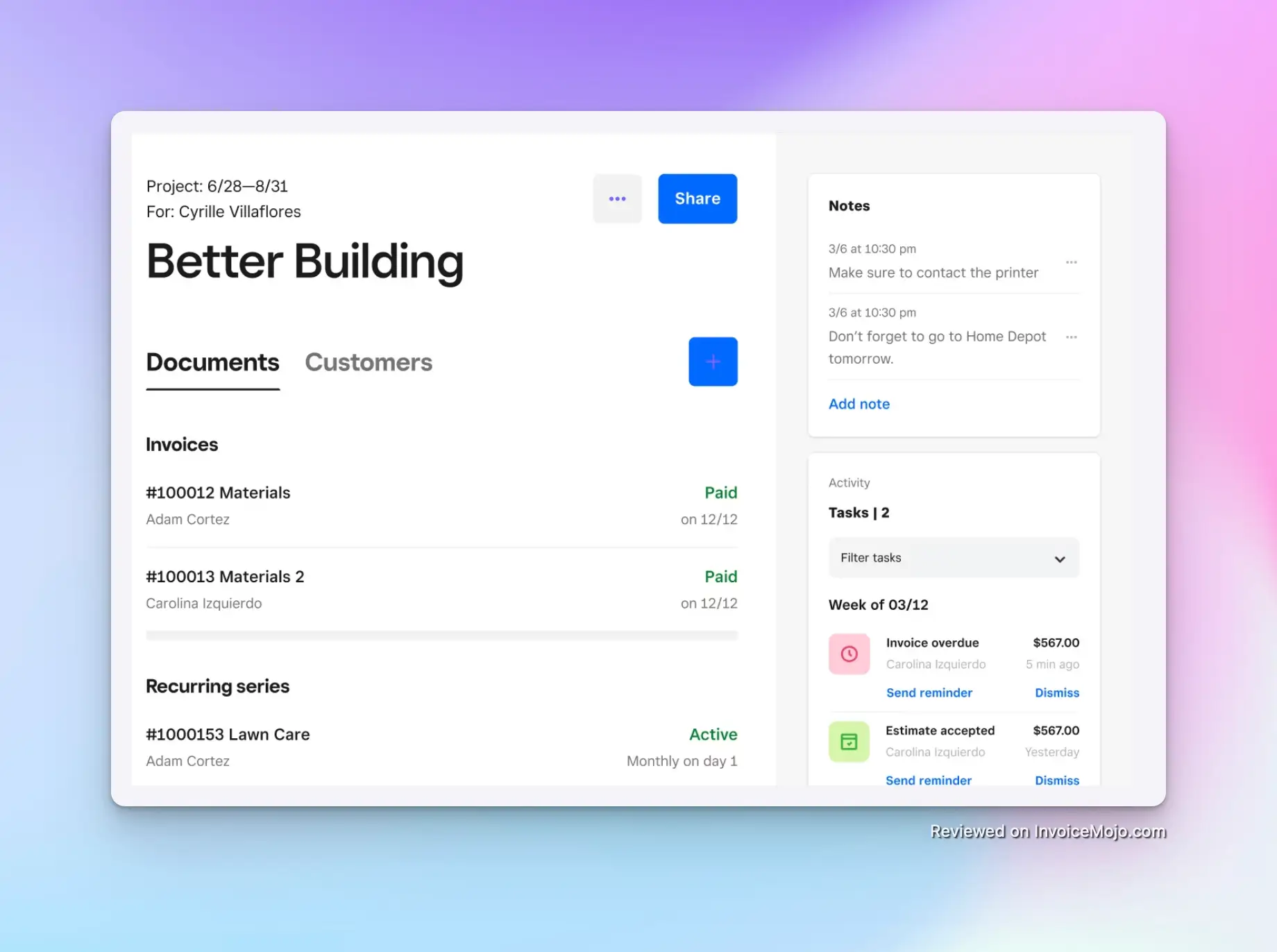
Managing projects with Square
Because Square Invoicing is part of the larger Square ecosystem, it integrates seamlessly with other Square products. If you use Square Point of Sale, all your sales and invoices are in one dashboard, giving you a consolidated view of your business income.
Square also offers other services like appointments scheduling, loyalty programs, and payroll; while those are outside the scope of invoicing, it’s good to know that you could manage many aspects of your business under one umbrella.
Square Invoicing can also integrate with third-party business software. Notably, it connects with popular accounting platforms QuickBooks and Xero, and others via APIs. This means your invoice data can sync to your accounting system for bookkeeping and tax prep.
Finally, Square has a dedicated Square Invoices mobile app (for iOS and Android) that allows you to do everything on the go: send invoices, check status, send reminders, etc. Users rate the app very highly (4.8 out of 5 on Apple’s App Store with over 85,000 ratings), which speaks to its usefulness for busy entrepreneurs who need to manage invoicing from their phones.
One of Square Invoicing’s biggest appeals is its straightforward pricing. Unlike many invoicing software options that charge a monthly subscription, Square’s base offering is completely free to use. You only incur fees when you process payments.
| Feature | Free Plan (Standard) | Plus Plan (Advanced) |
|---|---|---|
| Cost | $0 per month | $20 per month (30-day free trial) |
| Processing Fee (Online) | 2.9% + $0.30 per transaction | 2.9% + $0.30 per transaction |
| Processing Fee (ACH) | 1% per transaction (min $1 fee) | 1% per transaction (min $1 fee) |
| Processing Fee (In-person) | 2.6% + $0.10 per transaction | 2.6% + $0.10 per transaction |
| Key Features | • Unlimited invoices, estimates, and contracts • Recurring invoices • Payment reminders • Multiple payment options • Basic branding • Real-time tracking • Multi-user access | Everything in Free, plus: • Custom templates • Custom fields • Milestone payments • Multi-package estimates • Batch invoicing • Layout customization • Lower processing fees |
| Best For | Freelancers, side hustlers, new businesses, and those with occasional invoicing needs | Growing businesses, power users who need advanced features or send high volumes of invoices |
There are no contracts or long-term commitments with either plan. You can use the free plan indefinitely or upgrade to Plus only when you need those additional features.
The general user feedback for Square Invoicing is very positive, especially regarding its simplicity and effectiveness for small businesses.
Square Invoices earns high marks across review platforms: 4.7 out of 5 stars on G2 (based on ~160 reviews), 4.6/5 on Capterra, and around 4.5/5 on Trustpilot. The Square Invoices mobile app enjoys a 4.8/5 star rating on the Apple App Store with tens of thousands of reviews.
The most common praise centers on ease of use and time savings. Users frequently mention how quick and straightforward it is to send invoices and get paid, often describing it as “simple, intuitive, and convenient.” Many appreciate not needing extensive training—they can just dive in and start invoicing.
The ability to accept various payment methods in one link is another highlight. Small business owners love that customers can pay instantly online without hurdles. Users also consistently praise the professional look of the invoices with logo and color customization, giving even tiny businesses a more established appearance.
The automatic reminders feature garners positive comments as well, with users noting that it helps them avoid awkward follow-ups. The convenience of the mobile app is regularly mentioned as a game-changer for freelancers who need to invoice on the go.
Many users also comment on Square Invoicing being excellent value. Since there’s no subscription cost, users feel they’re getting substantial functionality for free—especially those who were previously creating invoices manually in Word or Excel.
The most prominent criticism relates to transaction fees. Some users express frustration about the ~3% fee on card payments, especially for large invoices. Many mention workarounds like building the fee into their pricing or encouraging ACH for big payments.
A few users note occasional email deliverability issues, with some invoice emails landing in clients’ spam folders. This isn’t widespread but has been mentioned enough to note.
There are also scattered reports of account holds or sudden deactivations, usually from users who processed unusually large amounts or operated in businesses Square considers higher risk. While these are edge cases, they do appear in negative reviews.
Finally, some users mention features they wish Square Invoicing had, such as more sophisticated recurring billing options or deeper accounting software integration without third-party tools.
Yes, the basic Square Invoicing software has no monthly fee. You can send unlimited invoices for free, only paying processing fees when a customer pays online (3.3% + 30¢ per card transaction on the free plan).
Clients can pay via credit/debit cards, ACH bank transfers, Apple Pay, Google Pay, Cash App Pay, and Afterpay (Buy Now, Pay Later). You can also record cash or check payments manually at no fee.
Yes. You can set up invoices to automatically recur daily, weekly, monthly, or on custom schedules. The system will generate and send these invoices automatically, saving you time on repetitive billing tasks.
Yes, Square Invoicing integrates with popular accounting platforms like QuickBooks and Xero, allowing your invoice data to sync for bookkeeping and tax preparation.
Yes, but with limitations. You can send invoices to international clients, but only in your account’s base currency. The client’s card will be charged in your currency and their bank handles the conversion.
Very secure. Square adheres to strict security standards (PCI DSS Level 1 compliant), with encrypted payment processing and fraud detection measures in place to protect you and your customers.
Square Invoicing stands out as an exceptional choice for freelancers and small businesses seeking a professional invoicing solution. Its combination of zero monthly costs, user-friendly interface, and robust features delivers impressive value that’s hard to match in the market.
For freelancers, consultants, and small business owners, Square Invoicing removes the friction from billing clients and getting paid. The ability to send invoices from anywhere using the mobile app, offer multiple payment methods, and automate reminders means you spend less time on administrative tasks and more on your actual work.
The system strikes an excellent balance between simplicity and capability: easy enough for beginners but powerful enough for growing businesses. While it isn’t without limitations (processing fees, country restrictions, and some advanced features being paid), these drawbacks are relatively minor compared to the overall benefits.
Even as your business grows, Square Invoicing can scale with you, either through the advanced features in the Plus plan or by integrating with Square’s broader ecosystem of business tools. This adaptability, combined with Square’s continuous improvements to the platform, makes it a solution you can rely on long-term.
The bottom line: If you want a no-commitment, professional invoicing system that helps you get paid faster without adding complexity or monthly costs to your business, Square Invoicing delivers excellent performance and value. Its free plan covers everything most small businesses need to manage invoicing effectively, making it a smart choice that can immediately improve your billing process.